Creating Music With Groove Pizza
One of my favorite ways to use technology with students is to have them create music. Lucky for us, there are so many great options available. Today I’m going to share a tool I’ve been using for several years in my music classes. It’s free, accessible from any device, and fun!

Groove Pizza
Groove Pizza, made by the NYU Music Experience Design Lab, allows you to create rhythmic grooves and loops. The interface is shaped like a pizza where each slice represents a subdivision and the toppings are the sounds. By clicking on the pizza’s grid, you can add or remove sounds. You can play your creation and listen to your groove loop.

Groove Pizza’s Features
What makes Groove Pizza fun is its additional features and capabilities. They give the tool even more educational purposes for the music classroom.
Groove Pizza comes with eight pre-made grooves called “Specials” that you can use and edit. Some of these specials include familiar beats such as Billie Jean, Chameleon, and Rock You. There are also shapes you can drag to the pizza, or add sounds by clicking on a numbered grid.
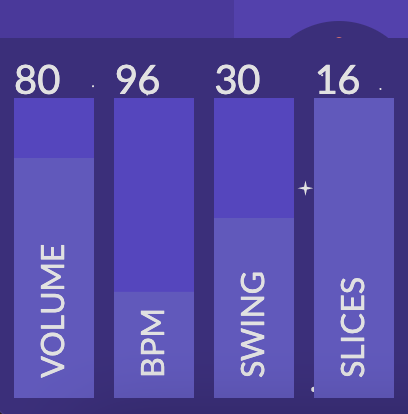
When creating your groove, there are several adjustable settings. You can adjust the volume or tempo, ranging from 50 to 180 BPM. You can also add varying levels of swing to the groove. In addition, you can select how many slices the pizza has, anywhere from 3 to 16.
There are five different instrument sounds: Afro-Latin, Hip-Hop, Jazz, Latin, or Techno.



Each groove can have up to four different loops (pizzas) that will play sequentially.
Once you have created a groove, you can share it by link or download a WAV or MIDI file. Grooves can also be opened in Soundtrap! Here, each pizza appears as a separate track.
Groove Pizza also has cross-curricular applications, as it allows you to see the angles in each shape on the pizza. Students can even think about fractions when looking at the pizza slices.
How to Use Groove Pizza in the Music Classroom
The uses for Groove Pizza are endless! Here are some ways I used it when teaching elementary and middle school instrumental music.
- Students could create grooves to accompany warm-up exercises, technique drills, or simple songs from the method book. The groove serves as a metronome, making potentially monotonous exercises much more interesting!
- Incorporate inquiry by having students explore Groove Pizza to discover concepts about meter. Encouraging this free investigation allows students to ask their own questions and find the answers.
- Students could create grooves to demonstrate their understanding of rhythmic concepts like subdivision, strong and weak beats, etc.
- Connect grooves to traditional notation by having students notate the rhythms they created.
- Use Groove Pizza for dictation by having students re-create rhythms or grooves they have heard.
I like that Groove Pizza is easy to use and accessible to young musicians, but also contains complex elements that more experienced musicians will enjoy and benefit from. The visual elements of the pizza and grid give students another way to understand and process rhythmic concepts.
If you’ve never used Groove Pizza before, I recommend exploring it on your own for a few minutes, then sharing it with your students! Start by having them create a simple groove, then determine which musical goals you want to connect it to. Consider asking the students how they could envision using it in class! They might have ideas you haven’t thought of yet.
Be sure to share what you try!
Looking for other tools to create music online? Check out these blog posts for inspiration:
- Using Google Slides in Music
- Inspiring Creativity With the Chrome Music Lab
- Podcasting in the Music Room
- Flat: Music Notation for Google Docs
Have you checked out Pass the Baton: Empowering All Music Students yet? If not, what are you waiting for?
“This book is a must read for teachers who want to empower students to become self-sufficient lifelong learners. It is a guidebook for creating a vibrant classroom where student learning is the first priority.”
-Kristin Gomez, MA, Director of Orchestras at Jefferson Middle School & Abingdon Elementary School